Scrobbling to ListenBrainz
Send what you play on your Mac, your iPod and Rockbox to ListenBrainz, including what's playing now, with plays kept while offline.
ClassicTunes can "scrobble" what you listen to: add each song you play to your listening history on ListenBrainz, a free, open service run by the MetaBrainz Foundation (the people behind MusicBrainz). It counts plays from three places:
- songs you play in ClassicTunes on your Mac,
- songs you play on your iPod, sent when it syncs,
- songs in a Rockbox play log.
Set it up
You need a ListenBrainz account and its user token.
- Choose ClassicTunes › Settings… and click Scrobbling.
- Click Open ListenBrainz to open your ListenBrainz settings, sign in there, and copy your User token.
- Paste it into User token and click Sign In.
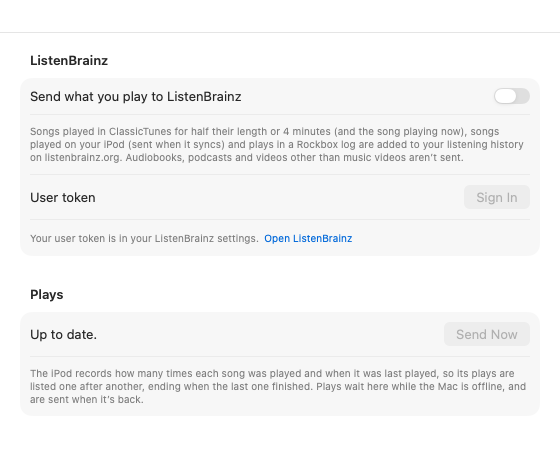
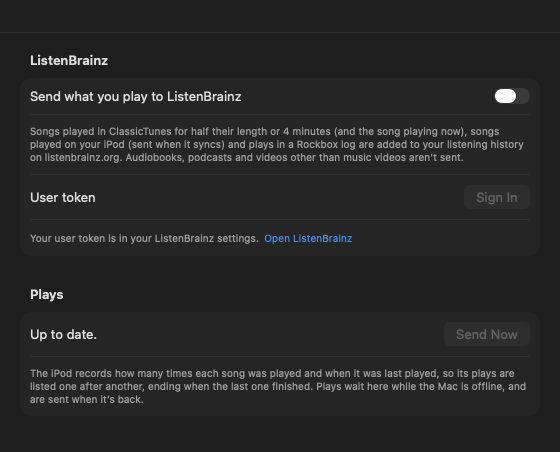
ClassicTunes checks the token with ListenBrainz, then says "Signed in as your name." and turns on Send what you play to ListenBrainz. If the token isn't accepted, it says so; copy it again and try once more.
The token is kept in your Mac's keychain. Your account and the on/off switch are the same for every library, since they're yours rather than a library's.
To stop for a while, turn off Send what you play to ListenBrainz. To disconnect your account, click Sign Out. Plays already waiting stay, and are sent if you sign in again.
What counts as a play
On your Mac
A song counts once you've listened to half of it or 4 minutes of it, whichever comes first. This is the rule Last.fm uses, which ListenBrainz follows. A few points:
- Only time you actually listen counts. Skipping ahead doesn't bring the song closer to counting, and pausing doesn't count.
- Songs of 30 seconds or less never count.
- The play is sent with the time the song started.
- Playing a song again, or repeating it, counts again.
Playing now
After a song has played for a second, ClassicTunes tells ListenBrainz it's Playing now, so it shows at the top of your ListenBrainz profile while it plays. This isn't a play and isn't kept: if it doesn't get through (while you're offline, say), it simply isn't shown.
From your iPod
The iPod records how many times each song was played since the last sync, and when it was last played, but not each time it was played. When you sync, ClassicTunes reads those back and sends a play for each one: the last ending when the iPod says the song was last played, and the earlier ones before it, one after another, a song's length apart. Plays dated before October 2002 (an iPod whose clock was never set) aren't sent.
From Rockbox
On an iPod or music player running Rockbox with its play log turned on, each sync reads the log and sends the songs you played through (not ones you skipped), with the time you played them. Each play is sent once. See iPod tools and Music players.
What isn't sent
Audiobooks, podcasts, and videos other than music videos aren't sent, and neither are songs with no artist. CDs you play without importing aren't either.
The queue, and being offline
Every play goes into a queue first and is sent a few seconds later. The Plays section of Settings › Scrobbling shows where things are:
- "Up to date." with when plays were last sent,
- how many plays are waiting to be sent, or
- "Sending…".
Click Send Now to send what's waiting straight away.
If your Mac is offline, or ListenBrainz can't be reached, plays wait in the queue, even if you quit ClassicTunes, and are sent when it's back. ClassicTunes tries again every 15 minutes, and sooner if ListenBrainz asks it to slow down. If ListenBrainz refuses a play, that one play is left out and the rest are still sent. Any problem is shown under the status in orange. If the token stops working (you made a new one on ListenBrainz, say), ClassicTunes asks you to sign in again and, with notifications on, tells you plays aren't reaching ListenBrainz.
Note: Plays are only collected while scrobbling is on and you're signed in. Songs you play while it's off aren't sent later.
The queue holds up to 50,000 plays; beyond that, the oldest are dropped.
From AppleScript and Shortcuts
tell application "ClassicTunes"
    if ListenBrainz account is "" then return "Sign in in Settings › Scrobbling first."
    set scrobbling to true
    log (plays waiting as text) & " plays waiting"
    send scrobbles
end tell
scrobbling turns sending on or off, ListenBrainz account is the user plays go to (empty when no one's signed in), plays waiting counts the queue, and send scrobbles sends it now and returns a sentence saying what happened. See AppleScript.
In Shortcuts (macOS 13 and later), use Turn ListenBrainz Scrobbling On or Off and Send Plays to ListenBrainz. See Shortcuts.